


Racing Fever: Moto
4.34.38K Reviews
App Specs
- Version
- 2.2.6
- Updated On
- License
- Free
- Downloads
- 100,000,000+
- Developer
- Gamebeam
- Categories
- Racing
- Platform
- Android, iOS
Screenshots
 Analysis by AppCompare
I find Racing Fever: Moto easiest to enjoy when I treat it as a quick burst of motorcycle racing rather than a game that must hold my attention for a long session. The first few minutes are straightforward, but the places people are most likely to get stuck are familiar mobile-game pressure points: choosing controls that feel comfortable, learning when braking matters, and deciding whether to spend time earning upgrades or pay to move faster. A little patience with those choices makes the races feel less like guesswork.
Start with the controls that suit you
The game lets you steer by tilting your phone, accelerate with a tap, and brake when needed. Tilt controls can feel natural once your hands settle into a position, but they can also be awkward if you’re playing on a crowded bus, holding a large device, or trying to keep the screen steady. I’d test the steering in a low-pressure race before settling on a style. If your bike keeps drifting, check your grip and how you’re holding the phone before assuming the game is responding badly.
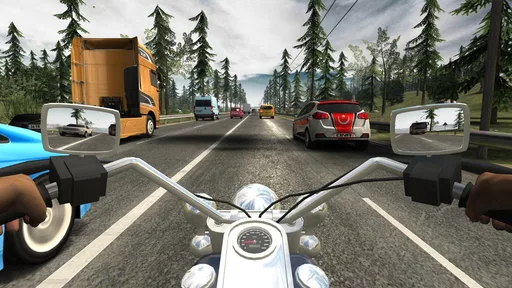
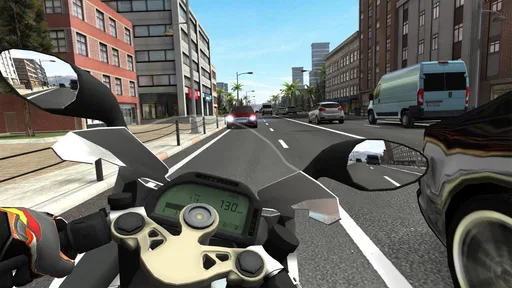
Camera choice is worth experimenting with too. I like the first-person view for immersion, but it makes the road feel closer and can be less comfortable if you prefer seeing more of the bike and its surroundings. The other camera angles give you a different sense of space. Try each briefly rather than choosing based only on appearance: the best view is the one that helps you read traffic and react consistently.
Small setup checks before a race
Before a longer play session, I make sure the phone is held securely and that I have enough room to tilt it without bumping into anything. That sounds basic, but it matters when steering is tied to movement. If inputs feel inconsistent, try a short run with a steadier grip and a different camera angle. This is a safer first check than changing several things at once, because it helps you tell whether the problem is your setup or your timing.
It also helps to think about sound and surroundings. The engine and road effects are part of the atmosphere, but a noisy place can make the audio less useful, while playing with sound off may remove some of the sense of speed. I treat sound as a preference, not a requirement: keep it on when it adds to the ride, and lower it when you need to stay aware of the room around you.
Recovering after a rough run
When a race goes badly, I try not to respond by immediately buying an upgrade. First I look at what went wrong: was I steering too sharply, holding acceleration too long, or missing a chance to brake? A small change in approach can be more valuable than a quick purchase, especially early on. Repeating a race with one adjustment at a time also makes it easier to learn which bikes and handling choices suit you.
Upgrades can still make a difference, and coins earned through races offer a way to improve without paying. The trade-off is time: if progress feels slow, in-app purchases are available, with prices ranging from $0.99 to $109.99 per item. I’d treat those as optional convenience, not a requirement for enjoying the game. If you’re considering spending, decide on a limit beforehand and remember that a stronger bike won’t automatically fix rushed decisions on the road.
Worth Reading Before You Choose

Flipboard Shows What News Apps Must Do Beyond the Feed

Switching to Android Auto Means Rethinking Your Driving Routine

Google Calendar Makes a Crowded Week Easier to Manage

Ludo King Makes the Most of the Minutes Between Plans

Baby Panda World Brings Quick Play to Modern Phones, but Its Game Library Feels Busy

ESPN’s Live Game View Makes Following Close Games Easier
When the game may not be the problem
Online duels are part of the appeal, but a competitive race can feel less smooth when your connection or surroundings are unreliable. If an online run feels interrupted, I’d first check whether the connection is stable and try again somewhere with a more dependable signal. For a more relaxed session, the other modes may be a better fit than testing your patience in a duel. Separating connection trouble from driving mistakes helps you judge the game more fairly.
Racing Fever: Moto is free to download, is rated for Everyone, and is made by Gamebeam. It has a 4.3 average from around 703,000 ratings and has passed 100 million installs, so it’s clearly found a broad audience. The game first appeared on January 9, 2018, and version 2.2.3 supports devices running Android 7.1 or later. Those details make it easy to judge whether it fits your device and comfort level before you start.
Revving Up: First Impressions
From the moment you open Racing Fever: Moto, you’re greeted with slick graphics and a user-friendly interface. The game doesn’t waste time—it’s all about getting you on the track as quickly as possible. The controls are intuitive, whether you’re a seasoned gamer or just starting out. Tilt your phone to steer, tap to accelerate, and brake when you need to, although let’s be honest, who uses brakes?
The Gameplay Experience
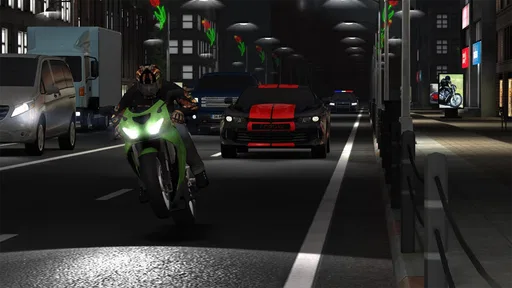
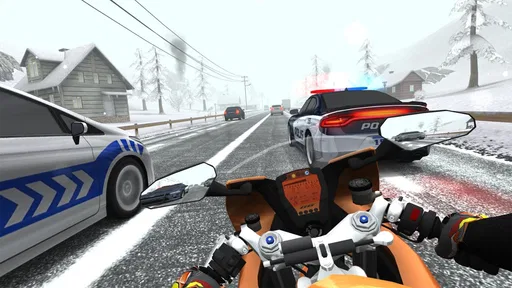
Once you hit the road, the adrenaline kicks in. The game offers four different camera angles, and I’m a fan of the first-person view. It feels immersive, like you’re actually on the bike. The attention to detail is impressive, from the realistic sound effects to the various weather conditions you’ll encounter.
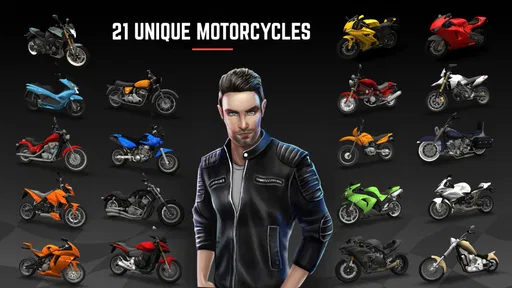
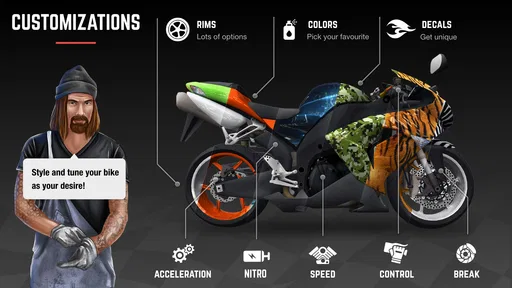
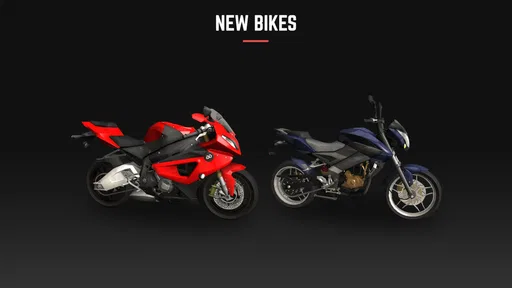
Racing Fever: Moto boasts over 20 different bikes, each customizable to fit your style. Whether you prefer speed, handling, or a balanced ride, there’s a bike for you. Upgrading your bike is crucial if you want to keep up with the competition. You can earn coins through races or opt for in-app purchases if you’re impatient, like me.
Modes and Challenges
The game offers several modes, including a story mode that keeps things interesting. Each boss you face has their own unique challenge. It’s not just about speed; it’s about strategy. You’ll find yourself coming back for more as you try to outsmart each boss.
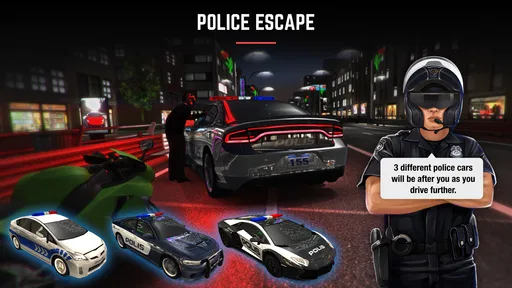
There’s also an escape mode where you dodge the police, which is a nice twist and adds an extra layer of excitement. And let’s not forget about the daily challenges and seasonal events that keep the game fresh and rewarding.
Graphics and Sound
The graphics are top-notch for a mobile game. The environments are diverse, ranging from bustling city streets to serene countryside roads. The detail in the scenery adds to the immersive experience. The soundtrack and sound effects are equally impressive, with roaring engines and screeching tires that make you feel like you're in the thick of the action.
Community and Updates
One of the things I love about Racing Fever: Moto is the active community. The developers are constantly updating the game with new features and challenges based on player feedback. It feels like a collaborative experience, and you can tell the developers are passionate about providing a top-tier racing experience.
Room for Improvement?
While the game is a blast, it’s not without its quirks. Sometimes the ads can be a bit intrusive, especially when you’re on a roll. And while the in-app purchases aren’t necessary, they can give paying players a bit of an edge, which might irk some competitive folks.
What kind of rider will enjoy it?
I’d recommend it to someone who wants a motorcycle game that can be picked up for a short break, with enough variety in camera views, bikes, and modes to make returning worthwhile. A commute break or a quiet wait before an appointment is a good fit: play a race, try a challenge, then put the phone away without needing to commit the whole evening. The story and escape modes also give solo players something to work through when they don’t feel like competing online.
It is less suited to someone who wants a detailed motorcycle simulator or a purely skill-based contest with no upgrade pressure. The focus here is on accessible, fast mobile racing, not reproducing every part of real riding. If you mainly want careful track simulation, precise mechanical tuning, or a calm experience without ads and purchase prompts, a different kind of racing game may suit you better.
How it compares with other mobile racers
Compared with the usual traffic or arcade racers, this one stands out most when you want a motorcycle perspective and a mix of solo challenges with online duels. Car racers may be easier to read at a glance because their viewpoint and handling are familiar to many players, while the bike presentation gives this game a more exposed, close-to-the-road feel. That comes with a trade-off: the same intensity can make a busy screen harder to parse, especially when you’re still learning how sharply to steer.
I wouldn’t choose it as a replacement for every racing game. It’s a better pick when the bike theme, quick races, and changing challenges are what you’re after; a slower simulation or a straightforward time-trial game is a better choice if you want fewer competing elements and a more measured pace. The online duels add a reason to test your improvement, but they aren’t the only reason to install it.
Making progress without wasting coins
One useful habit is to avoid upgrading several things just because a race felt difficult. I’d first repeat the same kind of run and focus on smoother steering and more deliberate braking. If that helps, you’ve improved your technique without spending. If it doesn’t, then a targeted bike improvement is easier to justify than scattering coins across upgrades without knowing what you need.
There’s also a practical difference between playing to progress and playing to unwind. When I’m in a hurry, I choose a mode that gets me into the action quickly; when I want a longer session, I can spend more attention on the story challenges or events. Keeping those aims separate makes the game feel less grindy. If the ads interrupt the rhythm, that’s a real downside to weigh against the fact that the game is free to download.
Questions I’d settle before installing
For device compatibility, the current version is 2.2.3 and the stated Android minimum is 7.1, so I’d check that before downloading on an older phone. The game is rated Everyone, which makes its stated age category broad, though parents should still decide whether its racing action and in-game purchase options are appropriate for their household. The available purchase range is wide, so I’d avoid treating any purchase as necessary just because a race is hard.
For someone wondering whether online play is essential, I’d say no: the story mode, escape mode, daily challenges, and seasonal events provide other ways to play. If a duel is a priority, a stable connection is a sensible starting point. If you’re asking whether it costs anything to try, the game is free, with optional in-app purchases; the main decision is whether ads and progression pace work for you.
Final Lap: My Verdict
Overall, Racing Fever: Moto is an exhilarating ride that’s sure to satisfy your racing cravings. It’s got the right mix of challenge, strategy, and fun to keep you coming back for more. Whether you’re a casual gamer or a racing aficionado, this game is worth a place on your device. So, gear up and hit the road, because the race is on!
Pros
- Stunning graphics with realistic environments.
- Engaging and challenging racing modes.
- Customizable bikes and upgrades available.
- Smooth and responsive controls.
- Multiplayer mode enhances competition.
Cons
- Contains frequent in-app purchases.
- Ads can be intrusive during gameplay.
- Requires a stable internet connection.
- Battery consumption is relatively high.
- Limited offline content availability.
FAQs for Racing Fever: Moto
What is Racing Fever: Moto and what can I expect from the gameplay?
Racing Fever: Moto is an exhilarating motorcycle racing game available on both Android and iOS. It offers a high-speed racing experience with realistic graphics, multiple game modes, and a variety of superbikes. Players can enjoy thrilling races through different environments, challenge friends, and customize their bikes for enhanced performance.
Does Racing Fever: Moto offer multiplayer options?
Yes, Racing Fever: Moto includes a multiplayer mode where you can race against friends or other players worldwide. This feature adds a competitive edge to the game, allowing you to test your skills against real opponents and climb the global leaderboard. It's perfect for those who enjoy social gaming experiences.
What are the customization options available in Racing Fever: Moto?
The game offers extensive customization options, allowing players to modify their bikes with a range of parts and accessories. You can enhance engine performance, upgrade tires, and choose from various paint colors and decals. This personalization ensures that your bike not only performs well but also reflects your style.
Are there in-app purchases in Racing Fever: Moto?
Yes, Racing Fever: Moto includes in-app purchases. While the game is free to download and play, players can buy in-game currency and other items to speed up progress or unlock certain features. These purchases are optional and not necessary to enjoy the core gameplay experience, but they can enhance it.
Is Racing Fever: Moto suitable for all age groups?
Racing Fever: Moto is generally suitable for teens and older players due to the competitive and fast-paced nature of the game. It is rated for ages 12 and up, as it contains realistic racing scenarios and may include mild language. Parents are advised to review the game content to ensure it aligns with their age preferences.


